Notes about this document
Explore a sample PaperTax guide
This fictional 2025 return in Vaud shows how documents become instructions for VaudTax. Explore the salary, securities and Pillar 3a examples, see what happens when a document is from the wrong year, and read sample chat conversations.
The note written on upload
“This is my first year declaring shares. I opened an IBKR account in January. My Pillar 3a is with my employer’s foundation. I lived in the same apartment in Lausanne all year.”
What usually goes wrong
These examples explain issues to check while preparing a return, including a document from the wrong year and deduction limits.
- A statement from the wrong year
- Your insurer or bank may offer statements for several years. This example uses a 2023 health statement for a 2025 return. The check identifies the year difference and asks for the 2025 statement.
- A first year with a broker
- A broker export and a Swiss electronic tax statement serve different purposes. For a supported broker, convert the export into an eCH-0196 statement that a compatible cantonal app can import.
- Moving canton mid-year
- You file one return, in the canton you lived in on 31 December. That canton taxes the whole year, and what you paid the old one comes back to you.
- Guessing at a cap
- Pillar 3a and insurance premiums both have limits that change. The guide shows the cap next to the value, so you are not working from last year's number.
The documents
Open a row to see the document next to what was read from it.
The guide
One card per document. Each entry is a field in the canton's official tax app, the value to type, and how to get there. Tick them off as you enter them.
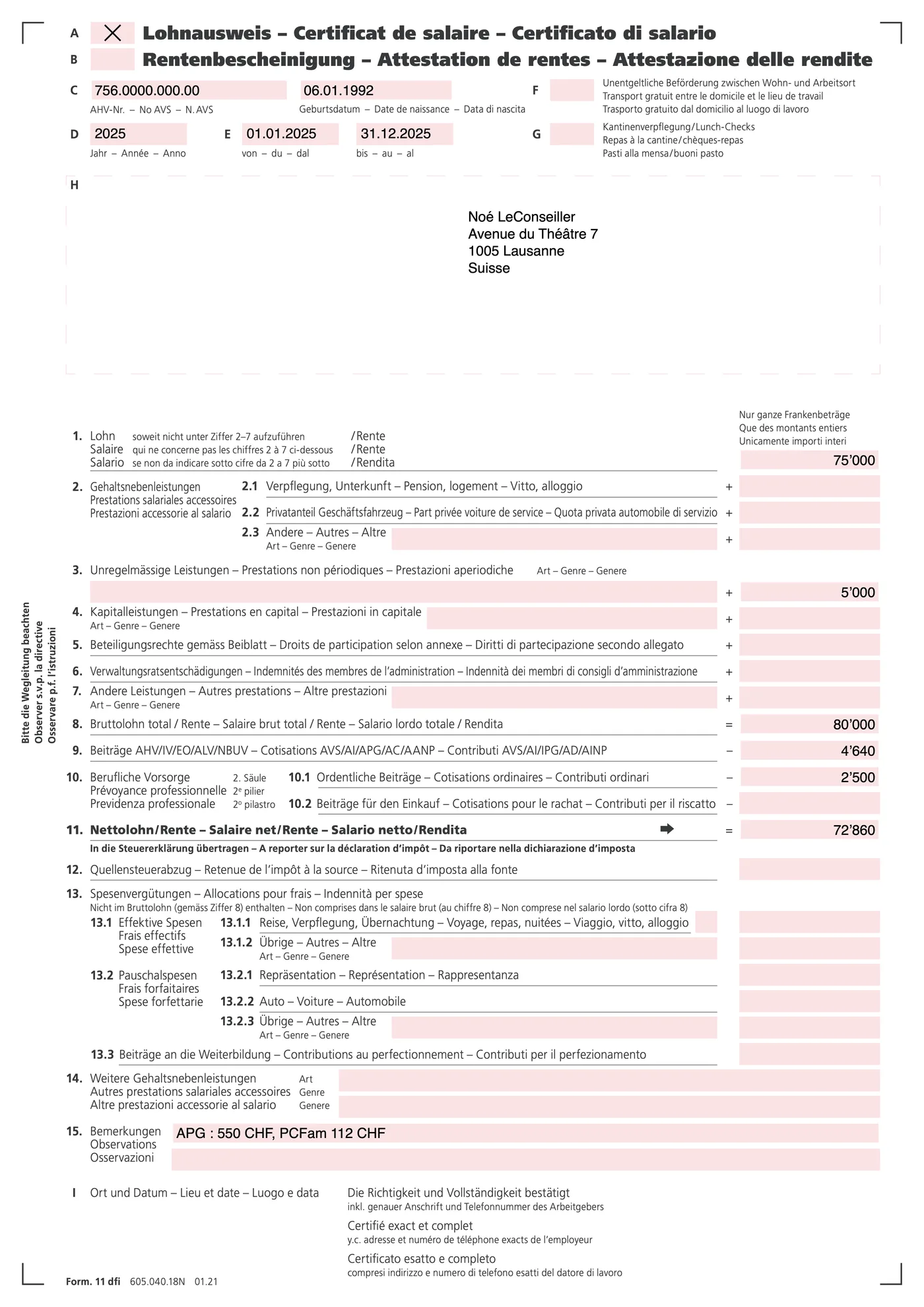
Salaire net (net salary)Chiffre 11
72'860
- Enter chiffre 11 (net salary) from the certificate. This amount already has the social insurance contributions deducted. Do not deduct those contributions again.
Période d'emploi (employment period)
01.01 – 31.12.2025
- Check that the employment period covers the full year. The tax app uses the period when calculating annual income.
0 of 2 entered into VaudTax
Relevé fiscal (tax statement)eCH-0196
1 PDF
- Import the PDF in the securities section of VaudTax. Check the imported holdings, income and DA-1 foreign withholding tax values.
Total de contrôle (check total)
39'351
- After the import, check that the securities total is 39'351. This includes the cash held with the broker.
0 of 2 entered into VaudTax
Cotisations 3a (contributions)
Below the CHF 7'258 maximum for employees with a pension fund in 2025.
6'000
- In VaudTax, open Déductions → Prévoyance 3e pilier A. Type the attested amount and keep the certificate as your supporting document.
0 of 1 entered into VaudTax
Corrections happen in chat
Your tax copilot
Vaud · 2025You
The Cotisations 3a value of 6'000 looks wrong. I paid more in December.
Assistant
The certificate you uploaded shows 6'000. It may not include your December payment. Ask your Pillar 3a foundation for the final 2025 certificate and upload it here. I can then update the entry and check it against the CHF 7'258 limit for an employee with a pension fund in 2025.
Once the guide is built, a second pass reads it back against the documents. Findings arrive the same way:
Your tax copilot
Vaud · 2025Assistant
I compared the guide with your documents. The KPT relevé de primes (premium statement) covers 2023, but this return is for 2025. I removed those amounts from the guide and added a card asking for the correct health insurance statement. Ask KPT for the 2025 statement and upload it here.